
Start with a
Tell us who you are, what you offer, what is hurting, and what a good outcome would look like. If an audit makes sense, we'll ask for your Google Ads customer ID. Don't have it? Don't panic. We're here to make your life easier, not harder.
Before we ask for budget
We start with what your prospects experience first: the page, the form and the enquiry path. If the useful answer needs Google Ads or CRM access, we say that plainly.

What the review looks for
Most wasted spend hides after the click.
We are not trying to invent a problem from the outside. We check whether the page, enquiry path and visible tracking give Google enough useful signal to improve.
Does the landing page match what the ad promised, answer the first buying questions, and make the next step obvious?
Where can someone hesitate, get blocked, choose the wrong route, or leave before they become an enquiry?
Can we see signs that meaningful enquiries are being measured? Anything account-side gets marked as needing Ads, Analytics or CRM access.
What you get back
- What we can see The public evidence, written plainly.
- Why it might matter The likely business impact, without pretending we can see private account data.
- What to check next The one or two checks that would confirm whether it is worth fixing.
Custom reporting portal
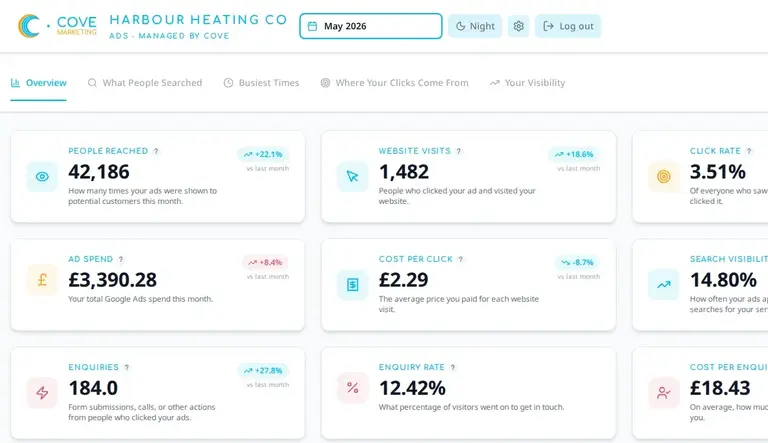
The detail is there. The takeaway comes first.
The portal keeps the account transparent without making you interpret every chart yourself. You can open the numbers whenever you want them, and we keep the next decision clear.
- A plain-English monthly summary
- The key numbers available when you want to dig in
- What changed, what we learned and what happens next
Sam & his team always deliver. Super responsive, great feedback on what we should do to improve, and quick to make changes. Truly the best company for our Google PPC.
Request a
Google Ads audit.
If you already want us to look at the account, send the Google Ads customer ID with your website. Don't have it to hand? Don't panic. We can help you find it, or talk it through on a quick call first.
Need help finding it? It is the 10-digit Google Ads customer ID, usually shown in the top-right of Google Ads.
What we'll check
- Who you are and what you are trying to achieve
- Where paid traffic feels stuck or wasteful
- Whether an audit is the right next step
- What account access or context we would need
- Customer ID needed before we call it an audit
- No passwords. No newsletter. Any future email is from Cove directly
- Prefer a chat? Book a quick call instead
Prefer to talk?
Book a quick discovery call.
No slides, no hard sell. We’ll ask who you are, what you offer, what is hurting, what your ideal outcome would be, and whether working together makes sense. If an audit is the right next step, we can discuss it on the call.